- The Trade Desk Global Supplier Resources
- Purchase Order Resources
GLOBAL SUPPLIER RESOURCES
Purchase Order Resources
The Trade Desk utilizes the Coupa Supplier Portal (CSP) for gathering and handling Supplier Information as well as Purchase Order and Invoice management.

1. Benefits of the Coupa Supplier Portal
- Free of charge – There is no cost to you!
- No software or hardware to download
- Easy to use interface
- View and Manage Purchase Orders, PO-Backed Invoices, and Payments
If you need assistance in setting up your CSP account or want to provide us with your CSP account email for us to link, please reach out to your contact at The Trade Desk for support.
2. Manage Purchase Orders in CSP
- Navigate to Orders Tab and select The Trade Desk from the Select Customer dropdown.
- All PO’s Created by The Trade Desk should be visible in the Purchase Order table.
- Actions on the PO are visible to the right of the table.
For a quick overview of managing your Orders in Coupa, check out the video below.
Under the Actions column in the Purchase Order table, Icons can be utilized for seamless processing.
Create a Credit Note from the PO
Advance Ship Notice (ASN)
When you receive a purchase order for goods you will be able to flip it into an ASN to share the shipping details and estimated arrival date with TTD. Click on the Flip to ASN icon in the Purchase Orders table.
Visit the Coupa Supplier Resources guide on Viewing, Creating, Editing, and Managing ASNs:
Purchase Order Status Glossary
| Status | Description |
| Buyer Hold | The PO is cancelled and does not need to be fulfilled. |
| Cancelled | The PO is cancelled and does not need to be fulfilled. |
| Closed | The issued PO was received and then closed, either manually or automatically within Coupa. |
| Currency Hold | The PO is on hold due to a currency exchange rate issue. |
| Error | Something is wrong with the PO. Contact your customer to get the PO back on track. |
| Issued | The PO was approved and sent to you. |
| Soft Closed | The PO is closed but can be reopened. You cannot invoice against a PO in this status. |
3. Manage your POs Without the Coupa Supplier Portal (CSP)
Although we highly encourage you to utilize the Coupa Supplier Portal (CSP), we understand this may not be a viable option for your company. To continue to manage your PO with The Trade Desk, please utilize Supplier Actionable Notifications through the email you receive containing the PO.
Supplier Actionable Notifications (SAN)
Allows you to interact with The Trade Desk without a Coupa Supplier Portal (CSP) account. You can acknowledge purchase orders, submit invoices, or add comments directly from Coupa’s email notifications.
You’ll get notifications upon submitting an invoice to The Trade Desk, along with updates on our actions to your invoice, enhancing transparency and minimizing the need for you as the suppliers to inquire via phone or email.
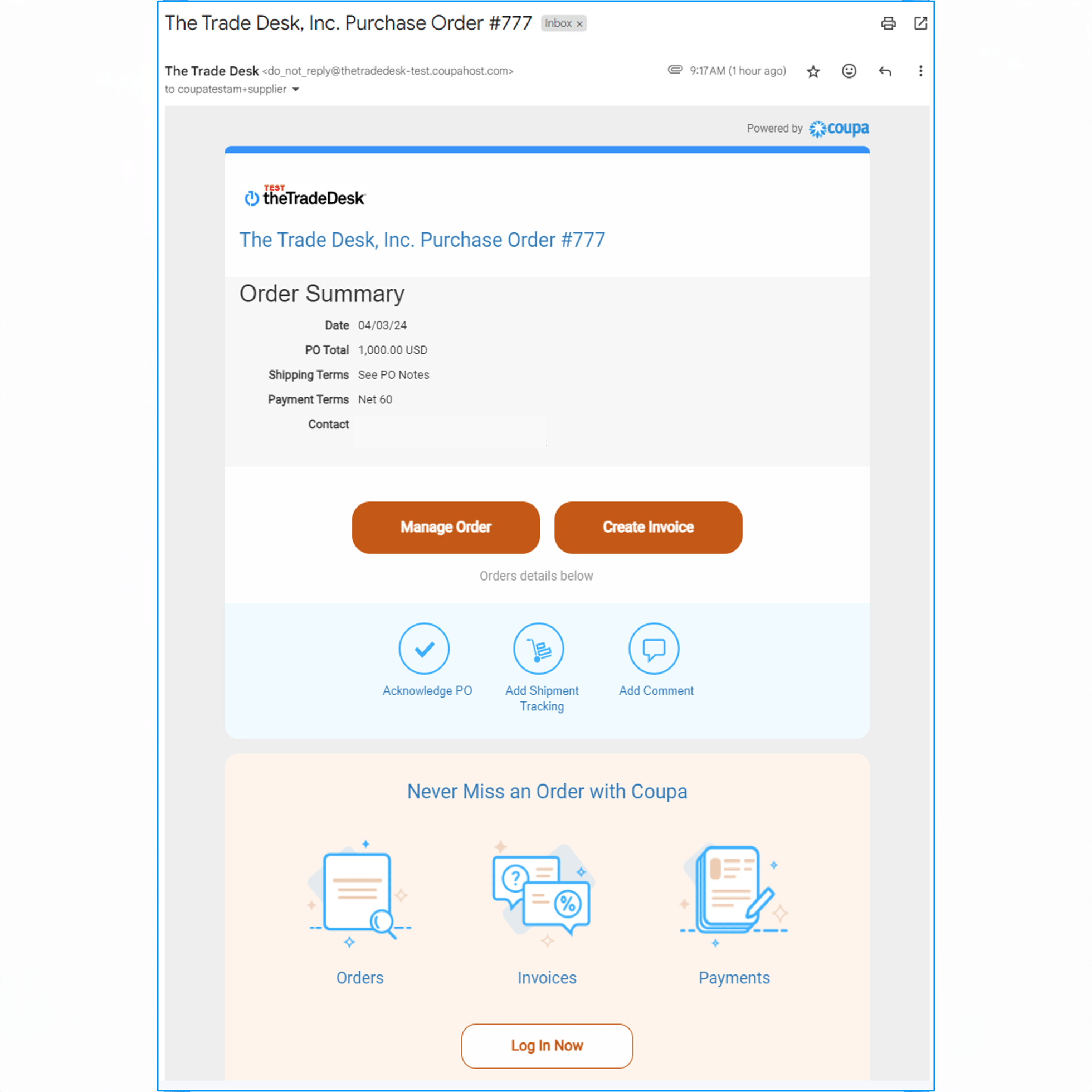
From the email you will have the option to:
- Manage Order
- Create Invoice
- Acknowledge PO
- Add Shipment Tracking
- Add Comment
- Review Payment Information
- Log into your CSP Account (CSP Account holders)
For step-by-step instructions, download our guide:
For additional PO Support, contact us through the Coupa Supplier Portal or reach out to your contact at The Trade Desk.