- The Trade Desk Global Supplier Resources
- Invoicing with The Trade Desk
GLOBAL SUPPLIER RESOURCES
Invoicing with The Trade Desk

1. Invoicing Requirements
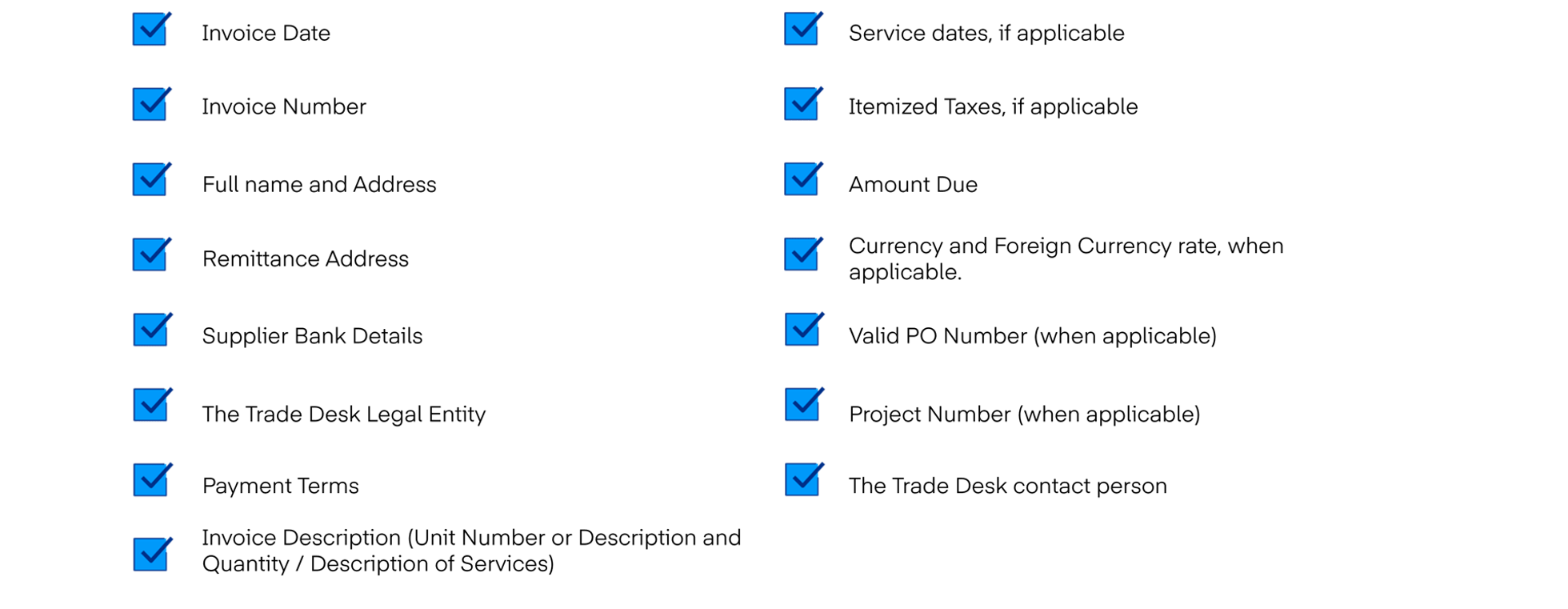
General Invoicing Requirements
The Trade Desk’s standard invoice format is PDF ‘Text’ Document for non-compliant invoicing and US based suppliers.
- If the invoice does not contain all the required information, it will be rejected by the Accounts Payable team and returned to you.
- Invoice billing entity MUST match billing entity set up on the PO or as per The Trade Desk signing entity on the work order/SoW/contract.
- When applicable, please include any additional supporting documentation.
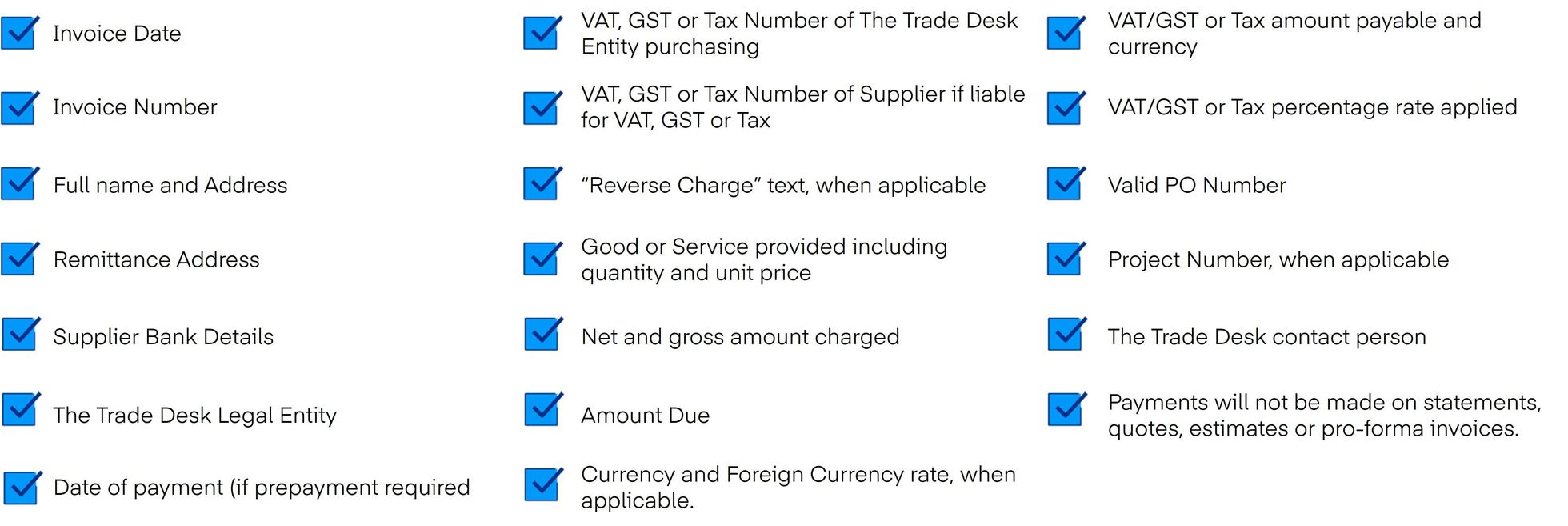
Invoicing Requirements for Asia-Pacific
Billing The Trade Desk Asia-Pacific entities require the following information.
2. Non-PO Backed Invoice and Credit Note Submission Guide
Invoice’s and Credit Memo’s which do not have a Purchase Order can be submitted to The Trade Desk Accounts Payable email.
The Trade Desk requests a PDF ‘Text’ document be submitted for processing when submitting an invoice or credit memo via email.
-
Invoices Billed to The Trade Desk United States Entity
AP@THETRADEDESK.COM -
Invoices Billed to The Trade Desk International Entities
AP.UK@THETRADEDESK.COM
3. PO Backed Invoice and Credit Note Submission Guide
Purchase Order Invoices and Credit Notes can be submitted in multiple different methods. How the invoice is submitted depends on if the supplier is electronically enabled.
Coupa Supplier Portal (CSP) – Suppliers can manage their account, view POs, and create invoices/credit notes.
Supplier Actionable Notifications (SAN) – Suppliers not registered through CSP can create an invoice from a PO email.
Direct Connection (cXML) – Punchout suppliers
Accounts Payable Email – A PDF ‘Text’ document is needed when submitting your invoice via email.
-
Invoices Billed to The Trade Desk United States Entity
[email protected] -
Invoices Billed to The Trade Desk International Entities
[email protected] -
Reach out to The Trade Desk Purchasing Team if you would like more information on Punchout Integrations.
[email protected]
Coupa Supplier Portal (CSP) Invoicing and Credit Note Guide
Suppliers who receive Purchase Orders (PO), can generate an invoice or credit note from your Coupa Supplier Portal.
If you do not receive a PO, you will not be able to submit an invoice from the CSP. Please submit via email to our Accounts Payable teams.
Important items to consider when creating your invoice in the CSP:
- If you have multiple Remit-To accounts, select the one tied to your payment bank before entering invoice details. Otherwise, the submission will fail and reset. If the correct Remit-To is missing, update your CSP profile.
- Suppliers must generate their own unique invoice number. Duplicate Invoice number’s will be rejected and delay payment.
- The invoice date populates to today’s date but can be updated to align with when goods were shipped, or when services were delivered.
- Currency should align to the currency of the PO. If the currency selected does not match your agreement, please contact The Trade Desk buyer.
- You will have the option to add Attachments which should only be utilized for additional support documents, not a copy of the Coupa or supplier generated invoice.
- Dependent on the type of purchase, you will not be able to add non-PO backed lines or pick lines from a Contract. If you notice something incorrect on a PO, please reach out to your contact at The Trade Desk.
Create your CSP Invoice or Credit Note
To create an invoice or credit note in the CSP, click on the Orders tab to view your available POs with The Trade Desk.
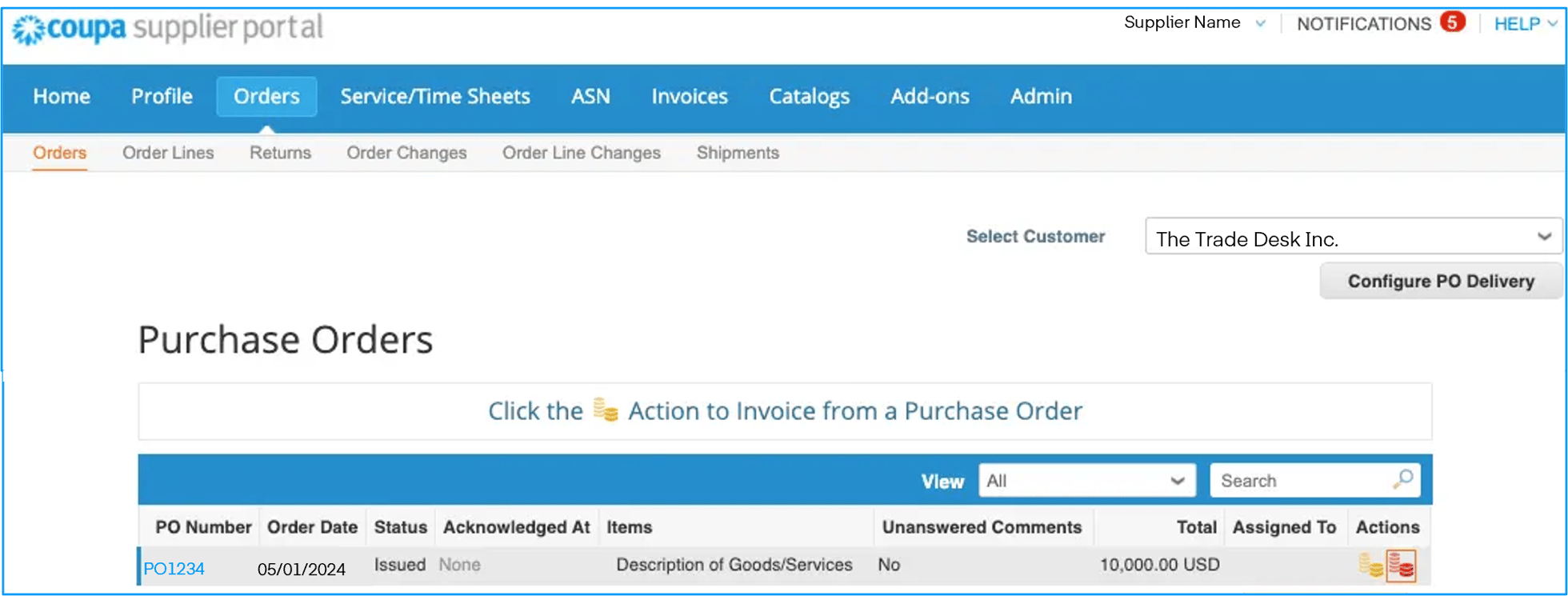
For a quick overview of managing your Invoices and Credit Notes in Coupa, check out the videos below.
Invoice Status CSP Glossary of Terms
| Status | Description |
| Abandoned | Specific for compliant e‑invoices for clearance countries. It indicates that a legal invoice form you sent failed validation. Invoices with this status are visible only to you, not to The Trade Desk. |
| Approved | The Invoice has been accepted for payment by The Trade Desk. |
| Disputed | The Invoice has been disputed. Additional information is displayed in the invoices table. |
| Draft | The Invoice has been created, but it has not been submitted The Trade Desk yet. |
| Invalid | Specific for compliant e‑invoices for clearance countries. It indicates that a legal invoice form you sent failed validation. Invoices with this status are visible only to you, not to The Trade Desk. |
| Pending Approval | The Invoice is currently under review by The Trade Desk. |
| Processing | The Invoice is being processed by the system and should be paid soon. |
| Voided | Something is wrong with the invoice. Contact The Trade Desk to get the invoice back on track. |
Supplier Actionable Notification (SAN)
Invoicing and Credit Note Guide
Supplier Actionable Notifications (SAN) allow you to interact with The Trade Desk without a Coupa Supplier Portal (CSP) account. You can acknowledge purchase orders, submit invoices, or add comments directly from Coupa’s email notifications.
You’ll get notifications upon submitting an invoice to The Trade Desk, along with updates on our actions to your invoice, enhancing transparency and minimizing the need for you as the suppliers to inquire via phone or email.
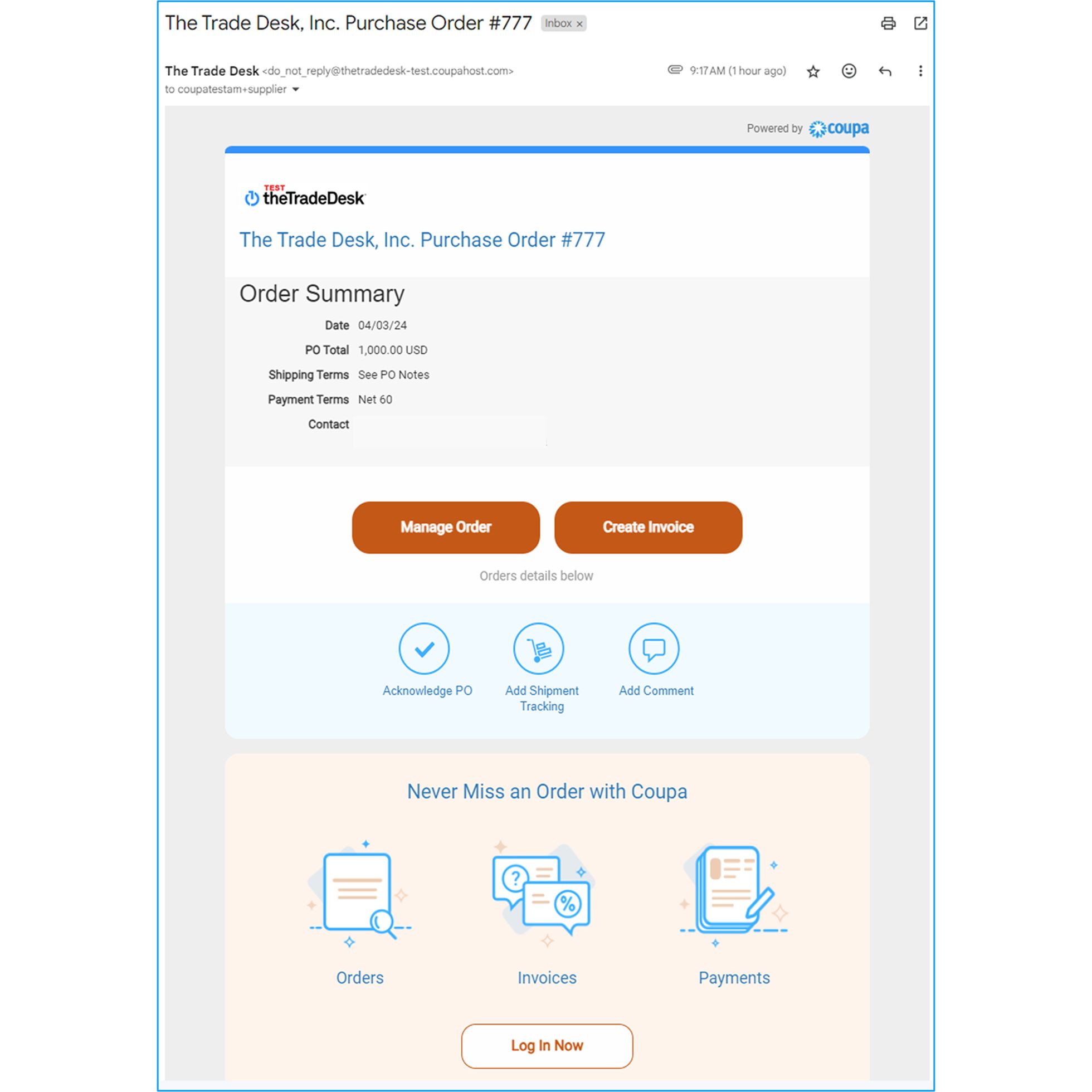
From the email you will have the option to:
- Manage Order
- Create Invoice
- Acknowledge PO
- Add Shipment Tracking
- Add Comment
- Review Payment Information
- Log into your CSP Account (CSP Account holders)
For step-by-step instructions, download our guide:
We hope this provides clarity on the Invoicing process with The Trade Desk!